Weekly Calendar Template
Choose the days, the hours and the row length, add the boxes you want and print a blank week to write in.
Recent
Your last 10 settings, saved only in this browser. Nothing is uploaded.
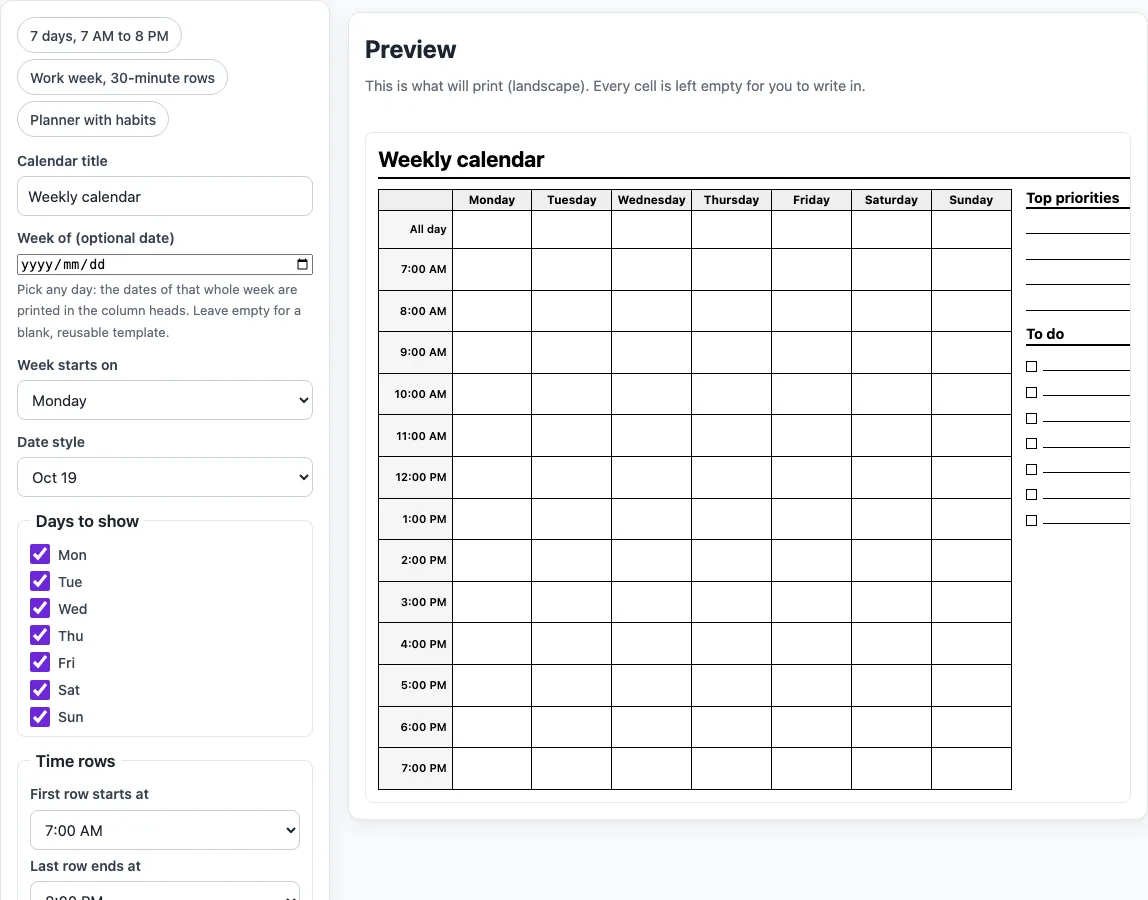
The Weekly calendar template is a free tool that builds a blank, printable weekly calendar. It shows one column for each day and one row for each time slot, so you can plan a week on paper. The tool runs in your browser, needs no account and uploads nothing.
You choose the title, the first day of the week, the days to show and the hours covered. You can also add an all-day row, a Top priorities box, a To-do list, Notes or a Habit checklist. Three presets give you a starting point for common layouts, such as a work week or a planner with habits. When the layout looks right, print it or save it as a PDF.
How to use the Weekly calendar template
- Type a Calendar title of up to 80 characters. Leave it blank to get “Weekly calendar”.
- Optional: enter a date in “Week of (optional date)”. Leave it empty if you want a sheet you can reuse every week.
- Choose Monday or Sunday in “Week starts on”.
- Choose a Date style: Oct 19 or 19 Oct.
- Tick the days you need in “Days to show”. All seven are ticked at first, and at least one must stay ticked.
- Set “First row starts at” and “Last row ends at”. The last row must end after the first one starts.
- Choose a Row length: 30 minutes, 1 hour or 2 hours.
- Choose a Clock: 12-hour (7:00 AM) or 24-hour (07:00).
- Tick any extra boxes you want: All-day row, Top priorities, To-do list, Notes or Habit checklist.
- Check the preview. It shows exactly what will print, and a message appears if a setting is not valid, for example when the last row ends before the first one starts.
- Select Print calendar.
The three presets fill in the controls for you: “7 days, 7 AM to 8 PM”, “Work week, 30-minute rows” and “Planner with habits”. Print calendar opens the browser print dialog with only the calendar, set to landscape, black on white. Choose Save as PDF there for a file. Copy link keeps your settings in the page address, and Reset returns every control to its default.
How do I make a weekly calendar template?
A weekly calendar template is a grid with days across the top and time slots down the side, left blank so you can write in it. The tool builds that grid from your settings: each ticked day becomes a column, and each time slot becomes a row. Every cell is empty, so the printed sheet is paper to write on.
The number of rows follows a simple formula:
rows = (last hour − first hour) × 60 ÷ row length
For example, 8:00 to 18:00 with 30-minute rows gives (18 − 8) × 60 ÷ 30 = 20 rows. 6:00 to 22:00 with 2-hour rows gives 8 rows. 0:00 to 24:00 with 1-hour rows gives 24 rows. If your sheet goes above 30 rows, the tool shows a warning, because the rows become too short to write in comfortably.
Can I choose the days and the hours?
Yes. Tick any combination of Mon to Sun under “Days to show”, as long as at least one is ticked. A work week needs only Monday to Friday, while a full week needs all seven. Each ticked day becomes one column, so unticked days are left off the sheet.
The hours come from “First row starts at” and “Last row ends at”, and the row length sets how much time each row covers. Larger row lengths give fewer, taller rows, which suits a planner with few entries each day. Shorter rows, such as 30 minutes, suit a busy day with many appointments.
Which extra boxes can I add?
The extra boxes sit in a column beside the grid. Top priorities has 4 lines, To do has 7 lines with a check box on each, Notes has 5 lines and Habits has 4 lines with check boxes. The All-day row is a taller first row for events that have no start time. If you show more than five days and switch on more than two side boxes, the tool warns that the day columns get narrow; turn a box off to give the days more writing room.
Worked examples
| Input | Result |
|---|---|
| 7 days, 7:00 to 20:00, 60-minute rows | 13 rows, Mon Oct 19, 2026 to Sun Oct 25, 2026 |
| 5 days, 8:00 to 18:00, 30-minute rows | 20 rows, no dates |
| 7 days, 7:00 to 20:00, 120-minute rows | 7 rows, Sun Oct 18, 2026 to Sat Oct 24, 2026 |
Calculated by the tool above; open it with the same values to see each step.
Frequently asked questions
Is the weekly calendar free and can I print it?
Yes. The tool is free, runs in your browser and needs no account. Select Print calendar to open the print dialog, which shows only the calendar in landscape, black on white. Choose Save as PDF there if you want a file instead of paper.
Can a week start on Sunday?
Yes. Set “Week starts on” to Sunday, and the columns will begin with Sunday. If you also enter a date in “Week of”, a Sunday starts its own week.
What does the “Week of” date do?
When you enter a date, the column heads show the real dates for the week that contains it, and a line such as “Mon Oct 19, 2026 to Sun Oct 25, 2026” prints under the title. For example, Wednesday 21 October 2026 with a Monday start gives Oct 19 to Oct 25. Leave the field empty to show weekday names only.
Does the tool store my appointments or send reminders?
No. The page does not hold appointments and does not send reminders. It only creates the printed layout, and every cell is left blank for you to write in.
Does the calendar show public holidays?
No. The tool does not mark public holidays, so add any that matter to you by hand.
Can I make a calendar for a work week only?
Yes. Untick Saturday and Sunday under “Days to show”, or select the “Work week, 30-minute rows” preset. That preset sets Monday to Friday, 8:00 to 18:00, with 30-minute rows, priorities and notes.
Can I use the calendar commercially?
Yes. Everything you make here is royalty-free for personal, classroom and commercial use, including planners and printables you sell on Etsy or in a KDP book. No credit is required. The only thing you may not do is copy the calendar generator or the site itself to run a competing service; see the terms.
Related tools
- Monthly work schedule template: Plan a full month of shifts, with hours per person worked out for you.
- Weekly work schedule template: Plan staff shifts for one week on a printable grid.
- Employee schedule template: List your employees and roles and assign a shift to each day.
- Attendance tracker: Mark who was present, absent or late over a month and see each person’s attendance rate.
- Employee availability form: Print a blank form for staff to say which days and hours they can work.
- Vacation request form: Print a leave request with the working days counted and the day back.