Rotating Shift Schedule
Type your own repeating shift pattern or load a common one, set the crews, and see the calendar and whether every shift is covered.
Recent
Your last 10 settings, saved only in this browser. Nothing is uploaded.
A rotating shift schedule maker builds a repeating calendar for crews that move through day, night, morning, afternoon, evening and off days. You enter one crew’s pattern, choose how many crews share it, and set how many days apart they start. The page then builds the calendar for every crew and checks how well each shift is covered.
Use it to test a rotation before you publish it, to compare crews side by side, or to see the average weekly hours a pattern gives. It works with 1 to 6 crews and cycles of up to 56 days, so it fits many common setups, from 8-hour rotations to 12-hour patterns. The steps below explain each control, and the explanation section covers the rules behind the results.
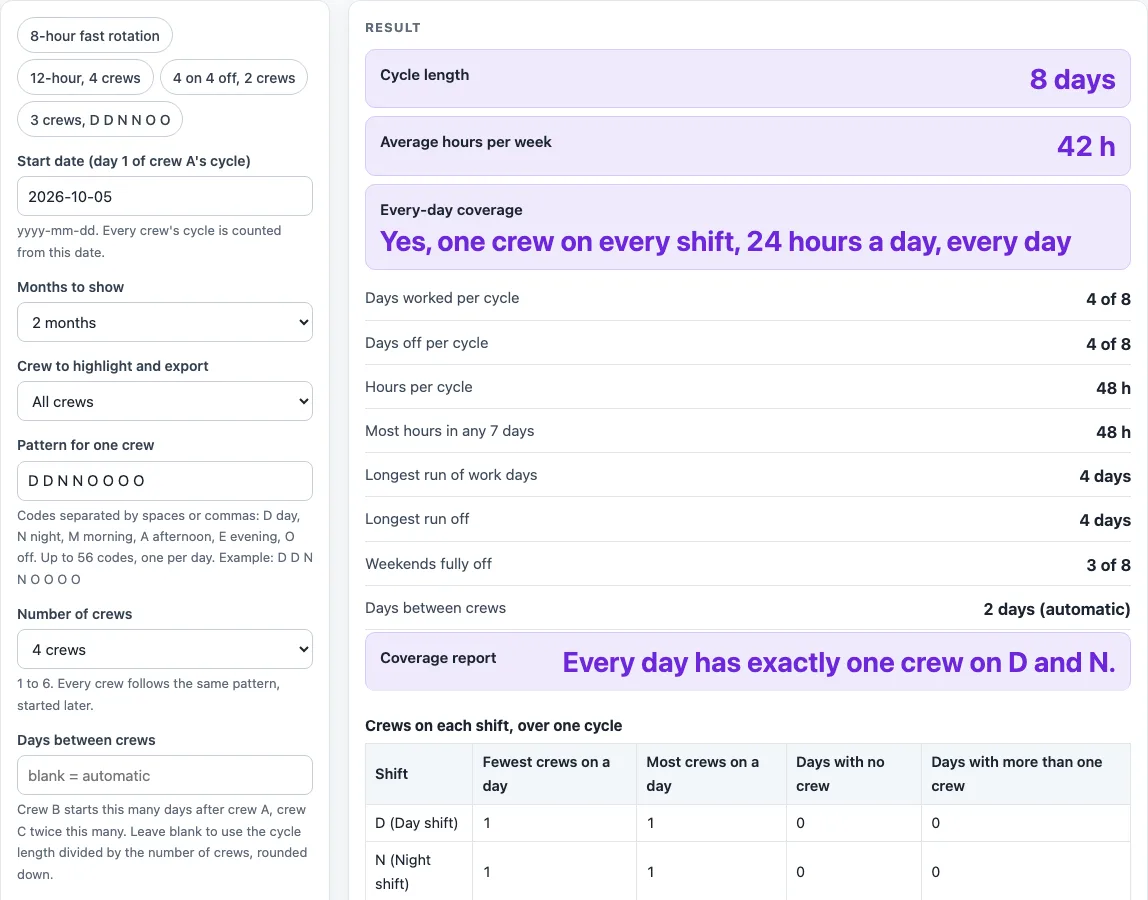
How to use the Rotating Shift Schedule
- Type one crew’s repeating pattern in the pattern box. Use D (day), N (night), M (morning), A (afternoon), E (evening) and O (off). Separate codes with spaces, commas or semicolons. Lower case works too. The default is D D N N O O O O.
- Choose the number of crews, from 1 to 6. The default is 4.
- Set the days between crews. Type a number from 0 to 56 to set it yourself, or leave it blank to let the page fill it in.
- Enter the hours per shift. This one number applies to every worked code in the pattern. The default is 12.
- Enter the start date for the calendar.
- Read the coverage report to see which shifts have no crew and which days have more than one crew on the same shift.
- Check each crew’s calendar to see which code that crew works on each date.
The page includes four presets: an 8-hour fast rotation (M M A A N N O O, 4 crews), a 12-hour rotation (D D N N O O O O, 4 crews), 4 on 4 off with 2 crews (D D D D O O O O), and 3 crews on D D N N O O, which gives 56 hours per week. Load a preset first, then change any control to fit your own pattern.
What is a rotating shift schedule?
A rotating shift schedule is a fixed pattern of shifts and days off that repeats after a set number of days. Each code in the pattern is one day, and the cycle length is the number of codes, from 1 to 56.
For the default pattern, D D N N O O O O, the cycle is 8 days. Crew A works day, day, night, night, then four days off, and the cycle starts again. That is 4 worked days of 12 hours in every 8 days, which is 48 hours per 8 days, or 42 hours per week on average.
How do the crews start at different days?
Each crew starts the same pattern a set number of days after the crew before it. This gap is called the offset. Crew k is crew A delayed by k times the offset, so on any cycle day, crew k works the code that crew A has on the day that many days earlier.
If you leave the offset blank, the page uses the cycle length divided by the number of crews, rounded down. For 8 days and 4 crews, that gives 2. Take the 3-crew pattern D D N N O O from 5 October 2026. Crews A, B and C work D, O and N that day. On 20 October they work N, D and O, because the pattern has moved on by 15 days.
How does the coverage report check for gaps and overlaps?
The coverage report counts, for each worked code, how many crews are on that code on each day of the cycle. It lists the fewest and most crews on each code, the days with no crew, and the days with more than one crew, then writes a plain sentence about the result.
Gaps appear when there are too few crews. D D N N O O O O needs one crew on D and one on N every day, which is 16 shift-days in an 8-day cycle. Three crews only work 12 shift-days, so the report says D and N are uncovered on 2 of the 8 days. Overlaps appear when the crews start too close together. With 4 crews on D D D D O O O O and an offset of 1, one day has no crew on D and five days have more than one.
Worked examples
| Input | Result |
|---|---|
| Pattern D D N N O O O O, 4 crew(s), 2 day(s) apart | 42 h per week on average. Every day has exactly one crew on D and N. |
| Pattern M M A A N N O O, 4 crew(s), 2 day(s) apart | 42 h per week on average. Every day has exactly one crew on M, A and N. |
| Pattern D D D D O O O O, 2 crew(s), 4 day(s) apart | 42 h per week on average. Every day has exactly one crew on D. |
| Pattern D D N N O O, 3 crew(s), 2 day(s) apart | 56 h per week on average. Every day has exactly one crew on D and N. |
Calculated by the tool above; open it with the same values to see each step.
Frequently asked questions
What does a “Yes” in the coverage result row mean?
“Yes” means the schedule covers all 24 hours of every day, 7 days a week. It appears only when every worked code has exactly one crew on every day and the shift hours add up to 24 per day.
Why does the page show an error message?
The page shows an error when the input cannot be used. Common causes are an empty pattern, an unknown code, more than 56 codes, a pattern with no worked shift, crews outside 1 to 6, a bad offset or hours value, or a start date that is not a real date.
Where do the start times in the calendar come from?
The calendar file sets start times from the shift code: D starts at 07:00, M at 06:00, A at 14:00, E at 18:00, and N at 19:00, or 22:00 when the shift is shorter than 10 hours. Each event lasts the number of hours you entered. For the default pattern, crew A has 29 events over 2 months from 5 October 2026.
Does the tool check whether my schedule is legal?
No. The page only does schedule arithmetic and says nothing about what any agreement or rule requires. Check your schedule against your own contract or local rules.
Is this tool free, and is anything I type uploaded?
Yes, it is free and needs no account or sign-up. Everything is calculated in your browser, and nothing you type is uploaded.
Can I print it or share it?
Yes. Print / save as PDF prints the page as you see it; choose Save as PDF in the print dialog to keep a file. Copy link copies a page address that stores your inputs, so the same schedule can be reopened later or sent to someone else.
Related tools
- Pitman Schedule: the Pitman 2-2-3 pattern for four crews.
- 9/80 Work Schedule: the 9/80 compressed schedule with every other Friday off.
- 2-3-2 Work Schedule: the 2-3-2 pattern, the same cycle as 2-2-3.
- DuPont Schedule: the 28-day DuPont pattern for four crews.
- Panama Schedule: the Panama 2-2-3 pattern with crews swapping days and nights.
- 2-2-3 Schedule: the 2-2-3 pattern, also written as 3-2-2-3.
- 4 On 4 Off Schedule: four days on and four days off for two or four crews.
- 4 On 3 Off Schedule: work patterns such as 4 on 3 off and 3 on 4 off.
- Continental Shift Pattern: the four-crew continental pattern.