Restaurant Work Schedule Template
Plan servers, cooks and hosts across open, mid and close shifts and see each person's weekly hours.
Recent
Your last 10 settings, saved only in this browser. Nothing is uploaded.
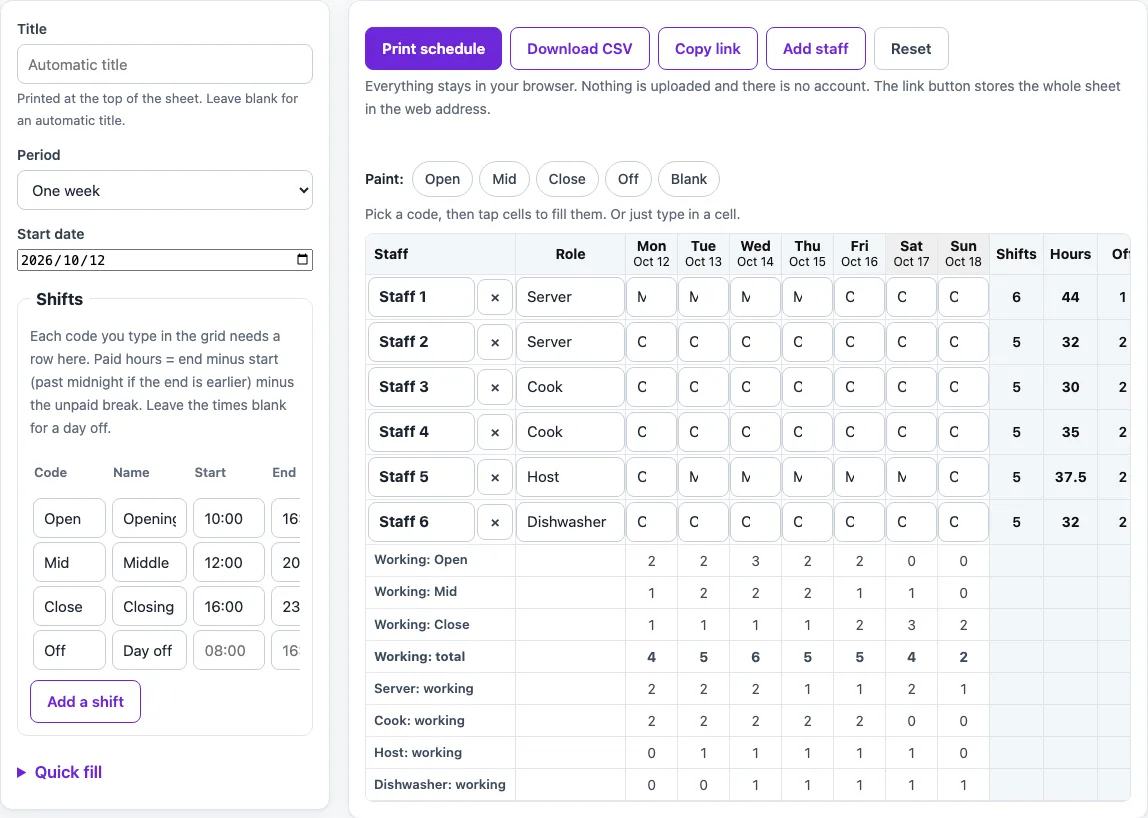
How to use the Restaurant Work Schedule Template
- Choose a period: one week (7 days), two weeks (14 days), a calendar month, or a number of days.
- Pick a start date. Week-like periods begin on the date you choose. A month always shows the whole calendar month.
- Type a title in place of the default “Restaurant schedule” text.
- Type a name in each row. Add a role in the Role column if you want role counts under the grid.
- Click a cell and type a shift code, such as Open, Mid, Close or Off. Codes are not case sensitive and can be up to 12 characters.
- Check the shift table so every code you use has its start time, end time and unpaid break.
- To fill many cells quickly, enter a pattern such as “S1 S1 S1 S1 S1 O O” in the Quick fill box and apply it to one row or every row. You can also copy the first week onto the following weeks, or clear cells.
- To paint cells by hand, tap a code chip, then tap the cells you want to fill.
- Read the warnings and fix any red codes, overlapping shifts or unreadable times before you share the sheet.
Use Print schedule to print the sheet, Download CSV to save the grid with totals, and Copy link to store the whole sheet in the web address. Reset returns you to the example sheet.
How are paid hours worked out in the restaurant work schedule template?
Paid hours for a shift equal the end time minus the start time, minus the unpaid break in minutes. The result never goes below 0, and an end time earlier than the start time means the shift runs past midnight.
For example, a Mid shift from 12:00 to 20:00 with a 30-minute unpaid break gives 8 hours minus 0.5 hours, which is 7.5 paid hours. An Open shift from 10:00 to 16:00 with no break gives 6 paid hours. A Close shift from 16:00 to 23:00 gives 7 paid hours. An Off code has no times, so it counts 0 hours. The default example totals 210.5 paid hours across 31 shifts, and each row adds up its own shifts.
The arithmetic is plain time subtraction and addition on the values you type. The page does not apply any legal or pay rule to them.
How do I fill in the cells quickly?
Click a cell and type a code, or use the arrow keys and Enter to move from cell to cell; the code list offers the codes defined in the shift table. On a phone, tap a code chip and then tap the cells to paint them. Quick fill repeats a pattern such as “D D N N O O O” along a row, optionally starting each row one step later, and can copy the first week onto the following weeks. A dash in the pattern leaves a cell blank.
What is in the CSV file?
Download CSV saves the grid with one row per person: the name, the codes for each date, and the totals. The header row uses dates in yyyy-mm-dd form. The file opens in any spreadsheet program. Nothing is sent anywhere; the file is made in your browser.
How does the staffing count work?
The count row at the bottom shows, for each date, how many people have each code. Use it to see at a glance whether a day has enough people on a shift. The page does not decide what is enough: you read the counts and judge for yourself.
Worked examples
| Input | Result |
|---|---|
| 6 rows, 7 days, Oct 5, 2026 – Oct 11, 2026 | 210.5 paid hours in total, 31 shifts |
| 6 rows, 14 days, Oct 5, 2026 – Oct 18, 2026 | 210.5 paid hours in total, 31 shifts |
Calculated by the tool above; open it with the same values to see each step.
Frequently asked questions
What happens if I type a code that is not in the shift table?
The cell shows in red, counts 0 hours, and the code is listed in a warning. Fix the spelling or define the code in the shift table.
Why does the page warn that shifts overlap?
It warns when two worked shifts in a row overlap, such as a night shift that ends after the next day’s shift starts. Change the times or codes in the affected cells to clear the warning.
Does the schedule check breaks and hours against labour law?
No. The page only adds and subtracts the times and breaks you enter, and it applies no legal or pay rule. Check your own local requirements separately.
Is this tool free, and is anything I type uploaded?
Yes, it is free and needs no account or sign-up. Everything is calculated in your browser, and nothing you type is uploaded.
Can I print it or share it?
Yes. Print / save as PDF prints the page as you see it; choose Save as PDF in the print dialog to keep a file. Copy link copies a page address that stores your inputs, so the same schedule can be reopened later or sent to someone else.
Related tools
- Weekly Work Schedule Template: plan a week of shifts for your team and print it.
- Monthly Work Schedule Template: plan a whole month of shifts and see hours per person.
- Employee Schedule Template: a schedule with roles and an hours target for each person.
- Shift Schedule Template: define shifts and times, then assign them to staff.
- Work Schedule Maker: build a schedule with auto-fill patterns and copy last week.
- Rota Template: a weekly or two-week staff rota.
- Staff Roster Template: a weekly, fortnightly or monthly staff roster.
- Nurse Shift Schedule: 12-hour day and night shifts for four weeks.