On-Call Rotation Schedule
Enter the names on your team, a rotation length and a start date to see who is on call in each period.
Recent
Your last 10 settings, saved only in this browser. Nothing is uploaded.
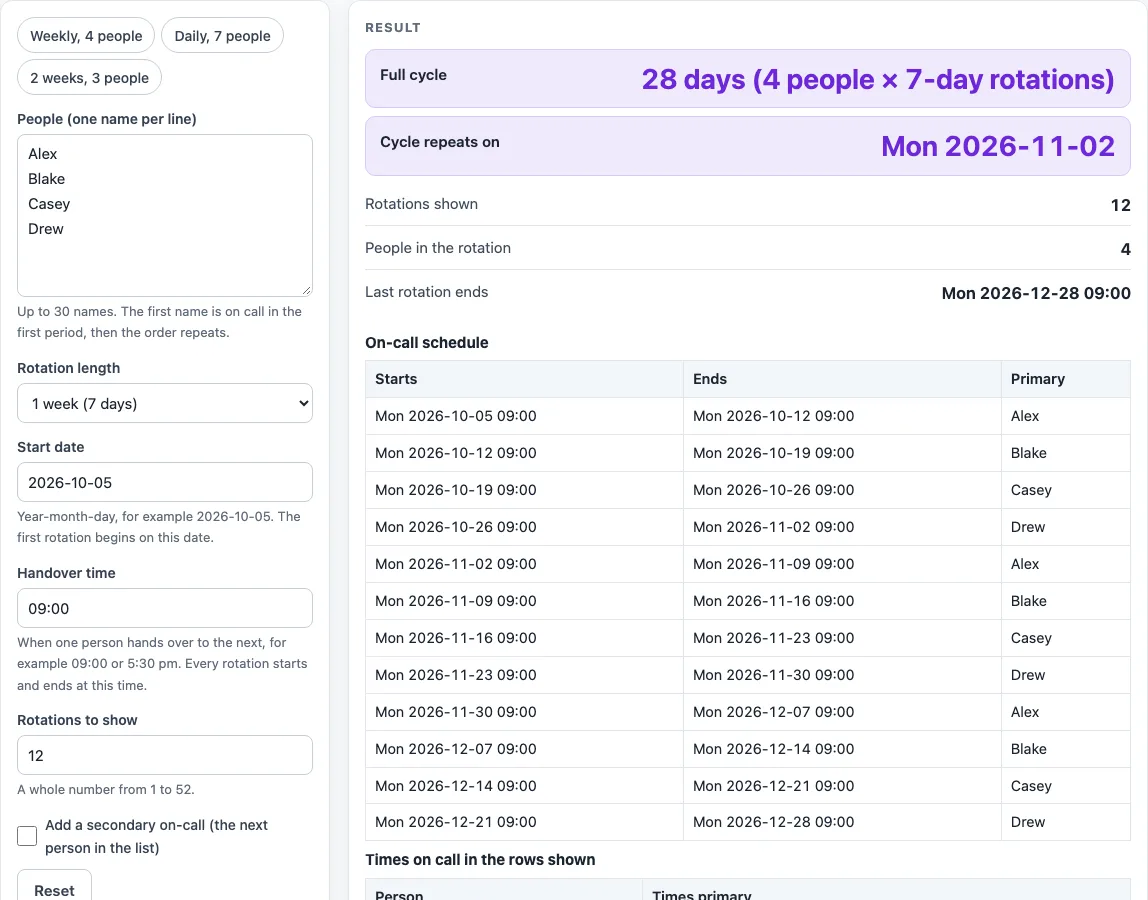
How to use the On-Call Rotation Schedule
- Type the names in the list, one name per line. You can use up to 30 names, and each name can be up to 60 characters.
- Choose the rotation length from the select: 1 day, 3 days, 1 week (the default), 2 weeks, or a custom whole number of days from 1 to 365.
- Type the start date as yyyy-mm-dd. The default is 2026-10-05. A date that is not real, such as 2026-02-30, shows an error message.
- Set the handover time as a clock time, such as 09:00 or 5:30 pm. Every rotation starts and ends at this time.
- Set Rotations to show, a whole number from 1 to 52 (default 12).
- Tick the optional secondary on-call box if you want a Secondary column. This needs at least two names.
- Read the schedule table, the count table and the result lines. Fix anything a warning points out.
- Click Download .ics to save the rotations as calendar events, or click Copy link to save your inputs.
You can also start from a preset: Weekly with 4 people, Daily with 7 people, or 2 weeks with 3 people. To keep a printed copy, use the browser’s print dialog and choose Save as PDF there. To share the schedule, use Copy link, which copies the page address with all your inputs in it.
How does an on call rotation schedule work?
An on-call rotation gives each turn to one person in a fixed order, then returns to the start of the list. This tool counts rotations from 0. Rotation number k starts at the start date plus k times the rotation length in days, and it ends one rotation length later. Every rotation starts and ends at the handover time you set.
The primary is the name at position k mod n in your list, where n is the number of names. With four names, rotation 0 goes to the first name, rotation 1 to the second, and rotation 4 goes back to the first. The “mod” step is what makes the list repeat.
How is the full cycle and repeat date worked out?
The full cycle is the number of names multiplied by the rotation length in days. With four names on 7-day rotations, the cycle is 28 days. The date the cycle repeats is the start date plus the full cycle. From Monday 2026-10-05, that gives Monday 2026-11-02.
All date maths is plain calendar arithmetic in UTC. A rotation can end in the next month or year, and a leap day such as 2028-02-29 is counted correctly. No daylight-saving or time-zone adjustment is applied.
What does the calendar file contain?
Download .ics builds a calendar file in your browser with one event per rotation, named “On call:” followed by the name. A handover time of 00:00 makes all-day events. Any other time makes timed events with no time zone, so your calendar shows them in your own zone. The secondary, if you tick that box, is listed in the event description.
What does the page not know?
The rotation is simple round-robin arithmetic on the names you type. It does not know about holidays, time off or swaps, so adjust the result by hand when someone cannot take a turn.
Worked examples
| Input | Result |
|---|---|
| 4 people, 7-day rotations from 2026-10-05 | 12 rotations, cycle repeats Mon 2026-11-02 |
| 7 people, 1-day rotations from 2026-10-12 | 14 rotations, cycle repeats Mon 2026-10-19 |
| 3 people, 14-day rotations from 2026-12-28 | 6 rotations, cycle repeats Mon 2027-02-08 |
| 3 people, 5-day rotations from 2028-02-25 | 9 rotations, cycle repeats Sat 2028-03-11 |
Calculated by the tool above; open it with the same values to see each step.
Frequently asked questions
Do the warnings mean the schedule is wrong?
Not always. A warning appears when a name is typed twice, which gives that person extra turns, when fewer rotations are shown than there are people, or when a weekly rotation starts on a day other than Monday. Each one points to something you may want to change before you share the table.
Does the schedule account for holidays, time off or swaps?
No. The page does not know about holidays, time off or swaps, so you will need to adjust the table yourself if these come up. It also does not state any rule about on-call hours, pay or rest.
What are the limits on names and rotations?
You can enter up to 30 names, with each name at most 60 characters. The schedule table never has more than 52 rows, and rotation length can be set up to 365 days.
Will the calendar file show the right times?
The Download .ics button creates one event per rotation, named ‘On call:
Is this tool free, and is anything I type uploaded?
Yes, it is free and needs no account or sign-up. Everything is calculated in your browser, and nothing you type is uploaded.
Can I print it or share it?
Yes. Print / save as PDF prints the page as you see it; choose Save as PDF in the print dialog to keep a file. Copy link copies a page address that stores your inputs, so the same schedule can be reopened later or sent to someone else.
Related tools
- Employee Availability Form: a printable form for staff to give their availability.
- Rotating Shift Schedule: build your own rotating pattern and check the cover.
- Work Schedule Maker: build a schedule with auto-fill patterns and copy last week.
- Weekly Work Schedule Template: plan a week of shifts for your team and print it.
- 12 Hour Shift Schedule: compare the common 12-hour shift patterns.