4 On 4 Off Schedule
Pick a start date to see the 4 on 4 off pattern on a calendar for two crews or four crews.
Recent
Your last 10 settings, saved only in this browser. Nothing is uploaded.
How to use the 4 on 4 off schedule generator
- Pick a variant. Choose two crews on days, four crews (day and night, the default), or two crews on nights.
- Enter a start date in yyyy-mm-dd format. The page opens with 2026-10-05, a Monday, rather than today’s date. Only real calendar dates are accepted. A date such as 2026-02-30 gives an error message, so correct it before you read the result.
- Check the shift times. The defaults are 07:00 to 19:00 for the day shift and 19:00 to 07:00 for the night shift. Type times in the 24-hour clock format.
- Choose how many months to show. Calendar output runs from your start date to the last day of the last month shown.
- Select a crew, or All crews. With All crews selected, there is one download button for each crew.
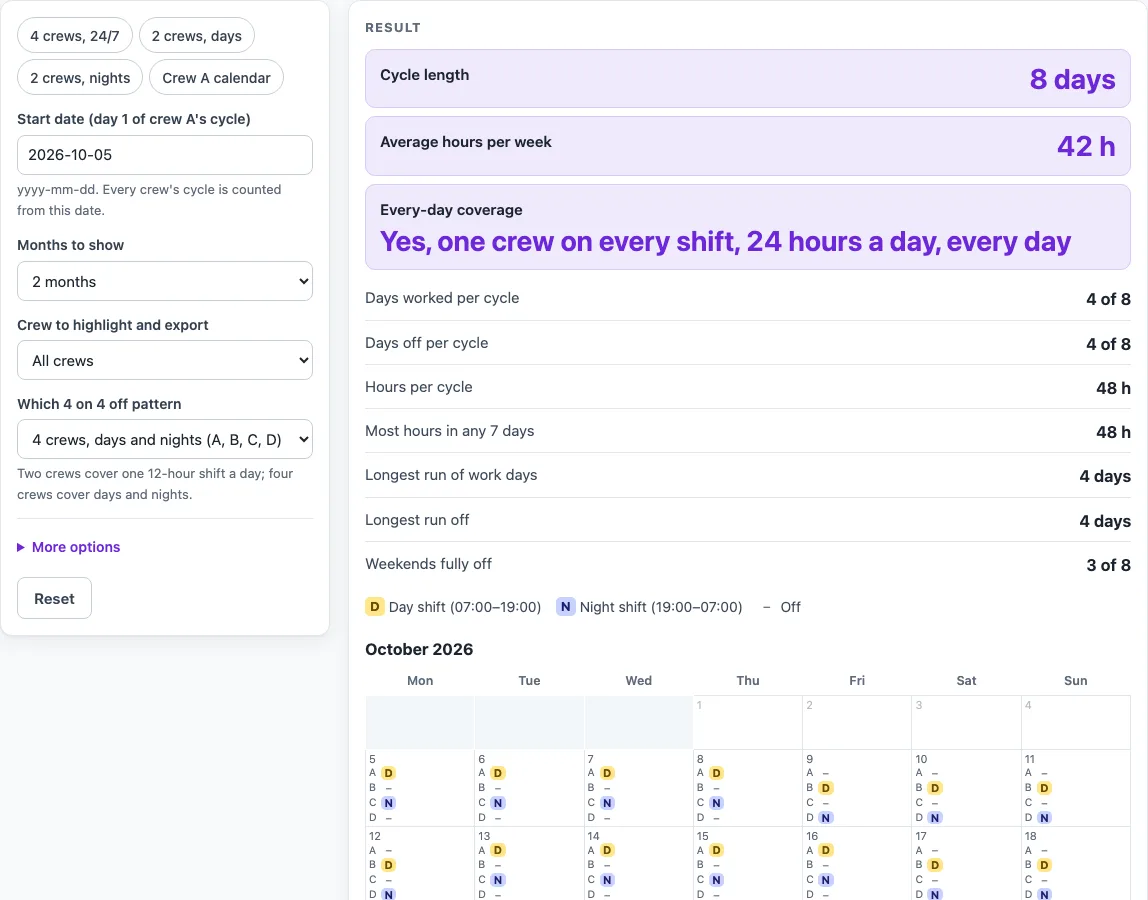
- Read the results. The panel shows the cycle length, days worked and off per cycle, hours per cycle, average hours per week, the most hours in any 7 consecutive days, the longest run of work days and of days off, weekends fully off, and whether every day is covered.
- Click Download .ics to save a calendar file for the selected crew. Each work day becomes one timed event in that file.
A 4 on 4 off pattern repeats every 8 days. A crew works four 12-hour shifts in a row, then has four days off, and the cycle starts again. Over one cycle each crew works 4 × 12 = 48 hours. Spread over the 8 days, that is 48 × 7 ÷ 8 = 42 hours per week on average.
Calendar weeks do not match that average, because 8 days does not fit into 7-day weeks. A Monday-to-Sunday week holds either 48 or 36 hours, depending on the weekday the cycle starts on. Starting on Monday 2026-10-05, one crew’s calendar weeks over a 56-day block come out as 48, 48, 48, 48, 36, 36, 36, 36 hours. The longest run of work days is 4, and the longest run off is 4, for every crew. Because the cycle does not line up with weekends, a crew that starts on a Monday has 3 of 8 weekends fully off over those 56 days.
Coverage depends on the variant. In the four-crew version, crews A and B cover days and crews C and D cover nights, so one day crew and one night crew are on every day. In the two-crew day version, one 12-hour shift is covered each day but nights are not. The page then reports coverage as one shift a day, not 24 hours. Crew B works the same pattern as crew A, shifted by four days.
Which variant should I pick?
Pick days only (two crews) if one 12-hour shift a day is enough. Pick the four-crew version for day and night cover. The nights-only variant shows two crews on night shifts. The cycle table lists all 8 days of the cycle.
Worked examples
| Input | Result |
|---|---|
| 4 crews, days and nights (A, B, C, D), start 2026-10-05, 2 month(s), All crews | 42 h per week on average, most 48 h in any 7 days, 4 of 8 days worked |
| 2 crews, day shift only (A and B), start 2026-10-05, 1 month(s), Crew B | 42 h per week on average, most 48 h in any 7 days, 4 of 8 days worked |
| 2 crews, night shift only (A and B), start 2027-01-04, 3 month(s), All crews | 42 h per week on average, most 48 h in any 7 days, 4 of 8 days worked |
Calculated by the tool above; open it with the same values to see each step.
Frequently asked questions
Does this tool check my pattern against labour or working-time rules?
No. The tool only does arithmetic on the pattern and states no working-time, rest or pay rule. Check any pattern against your own agreement and local rules before you use it.
What goes into the calendar file?
The file holds one timed event for each work day of the chosen crew, from the start date to the last day of the last month shown. The event times come from the shift times you typed.
What happens if the shift times I type don’t last 12 hours?
A warning appears. The hours figures still count each shift as 12 hours, so check the times if you need the totals to match your actual shift length.
Can I get one calendar file for every crew at once?
Not in one file. With All crews selected, the page shows one Download .ics button per crew, so each crew gets its own file.
Can I use this for a different rotation, such as 4 on 3 off?
This page covers only the 4 on 4 off pattern. For other rotations, open the matching related page listed below.
Is this tool free, and is anything I type uploaded?
Yes, it is free and needs no account or sign-up. Everything is calculated in your browser, and nothing you type is uploaded.
Can I print it or share it?
Yes. Print / save as PDF prints the page as you see it; choose Save as PDF in the print dialog to keep a file. Copy link copies a page address that stores your inputs, so the same schedule can be reopened later or sent to someone else.
Related tools
- Pitman Schedule: the Pitman 2-2-3 pattern for four crews.
- 9/80 Work Schedule: the 9/80 compressed schedule with every other Friday off.
- 2-3-2 Work Schedule: the 2-3-2 pattern, the same cycle as 2-2-3.
- DuPont Schedule: the 28-day DuPont pattern for four crews.
- Panama Schedule: the Panama 2-2-3 pattern with crews swapping days and nights.
- 2-2-3 Schedule: the 2-2-3 pattern, also written as 3-2-2-3.
- 4 On 3 Off Schedule: work patterns such as 4 on 3 off and 3 on 4 off.
- Continental Shift Pattern: the four-crew continental pattern.
- Firefighter Shift Schedule: 24/48, 24/72 and 48/96 platoon calendars.