2-2-3 Schedule
Pick a start date to see the 2-2-3 pattern on a calendar, written either way round as 2-2-3 or 3-2-2-3.
Recent
Your last 10 settings, saved only in this browser. Nothing is uploaded.
How to use the 2-2-3 Schedule
- Choose the variant. Pick two crews (crews A and B share one day shift) or four crews (crews A and B work days, C and D work nights).
- Enter the start date in yyyy-mm-dd format. The page opens with 2026-10-05, a Monday. A date that does not exist, such as 2026-02-30, shows an error.
- Open ‘Write the cycle starting with’ and pick 2 on first (2-2-3-2-2-3) or 3 on first (3-2-2-3-2-2). Both describe the same cycle, just from a different day.
- Check the shift times, written in 24-hour format. The defaults are 07:00 to 19:00 for days and 19:00 to 07:00 for nights.
- Set the number of months to show.
- Select a crew, or select All crews to see every crew at once.
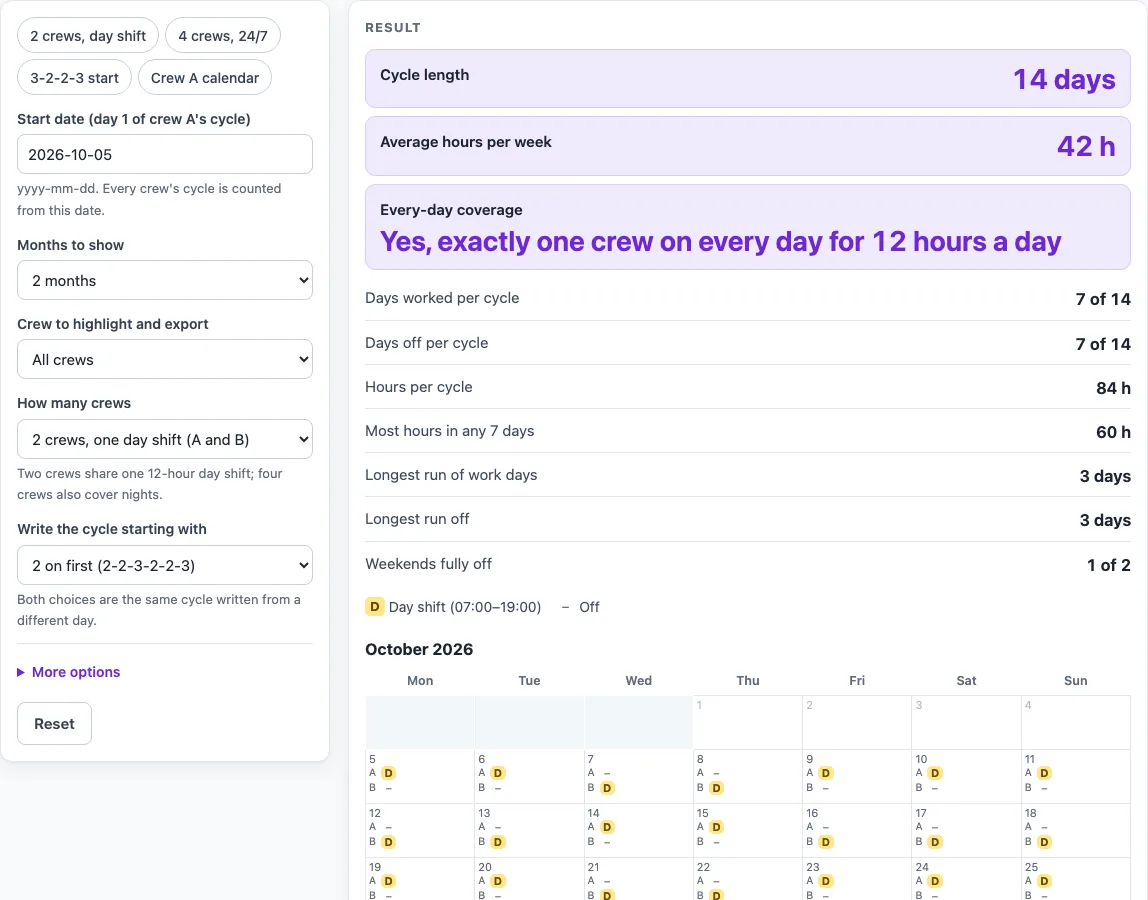
- Read the results: cycle length, days worked and off, hours per cycle, average hours per week, longest runs, weekends fully off, and whether every day is covered.
- Press Download .ics to save a calendar file. With All crews selected, there is one button for each crew.
Use Copy link to save your inputs. The link stores every setting, so the same schedule opens again later.
Change the start date to see the pattern begin on a different day. The crew select and the variant select change what the calendar shows.
What is a 2 2 3 schedule
A 2-2-3 schedule is a rotating shift pattern that repeats every 14 days. A crew works 2 days, is off 2, works 3, is off 2, works 2, and is off 3. Written out, the cycle is 2 on, 2 off, 3 on, 2 off, 2 on, 3 off. Some people write the same pattern as 3-2-2-3 because the cycle can start on the run of three.
On 12-hour shifts, a crew works 7 of the 14 days, which is 84 hours per cycle. Spread over two weeks, that averages 42 hours per week. This pattern is a common published one, and this tool only does the day and hour arithmetic on it.
Two other figures show how the pattern feels. The longest run of work days is 3, and the longest run of days off is also 3. In any 7 consecutive days, the hours range from 24 (2 shifts) to 60 (5 shifts). With a Monday start, crew A has 1 of the 2 weekends in the cycle fully off.
With two crews, crew B is crew A shifted by 7 days, so exactly one crew is on the day shift every day. Nights are not covered in this variant. With four crews, the layout matches the Pitman schedule: crews A and B work days and crews C and D work nights. That means one day crew and one night crew are on duty every day.
How do I see the 3-2-2-3 version?
Choose “3 on first” in the select that sets how the cycle is written. The calendar then starts with the block of three days on. It is the same cycle as 2-2-3 written from another day, so the hours per week do not change.
Worked examples
| Input | Result |
|---|---|
| 2 crews, one day shift (A and B), 2 on first (2-2-3-2-2-3), start 2026-10-05, 2 month(s), All crews | 42 h per week on average, 7 of 14 days worked per cycle |
| 2 crews, one day shift (A and B), 3 on first (3-2-2-3-2-2), start 2026-10-05, 1 month(s), Crew A | 42 h per week on average, 7 of 14 days worked per cycle |
| 4 crews, days and nights (A, B, C, D), 2 on first (2-2-3-2-2-3), start 2026-10-05, 3 month(s), Crew C | 42 h per week on average, 7 of 14 days worked per cycle |
Calculated by the tool above; open it with the same values to see each step.
Frequently asked questions
Why does my start date show an error?
The start date must be a real calendar date written as yyyy-mm-dd. A date such as 2026-02-30 gives an error because that day does not exist.
Why do the shift times show a warning?
Shift times are 24-hour clock times used for the calendar file. Each shift is counted as 12 hours in the hours figures, so a warning appears when the times you type last a different number of hours.
Does the tool check my contract or local working-time rules?
No. The page only does arithmetic on the pattern and states no working-time, rest or pay rule. Check any pattern against your own agreement and local rules.
Which variant should I choose?
Choose the two-crew variant if you only need one day shift shared by crews A and B. Choose the four-crew variant if you need day and night cover, with one day crew and one night crew on duty every day.
Why is the average 42 hours a week?
A crew works 7 of the 14 days at 12 hours each, which is 84 hours per cycle. Divided over two weeks, that is 42 hours per week. This is an average, so a single week can have more or fewer hours.
Is this tool free, and is anything I type uploaded?
Yes, it is free and needs no account or sign-up. Everything is calculated in your browser, and nothing you type is uploaded.
Can I print it or share it?
Yes. Print / save as PDF prints the page as you see it; choose Save as PDF in the print dialog to keep a file. Copy link copies a page address that stores your inputs, so the same schedule can be reopened later or sent to someone else.
Related tools
- Pitman Schedule: the Pitman 2-2-3 pattern for four crews.
- 9/80 Work Schedule: the 9/80 compressed schedule with every other Friday off.
- 2-3-2 Work Schedule: the 2-3-2 pattern, the same cycle as 2-2-3.
- DuPont Schedule: the 28-day DuPont pattern for four crews.
- Panama Schedule: the Panama 2-2-3 pattern with crews swapping days and nights.
- 4 On 4 Off Schedule: four days on and four days off for two or four crews.
- 4 On 3 Off Schedule: work patterns such as 4 on 3 off and 3 on 4 off.
- Continental Shift Pattern: the four-crew continental pattern.
- Firefighter Shift Schedule: 24/48, 24/72 and 48/96 platoon calendars.